Understanding Layer Adhesion in FDM Manufacturing
Layer adhesion determines the Z-axis tensile strength of FDM prints. Optimizing print temperatures, cooling fan speeds, and avoiding drafts prevents layer separation and splitting.
The Mechanics of Layer Fusion
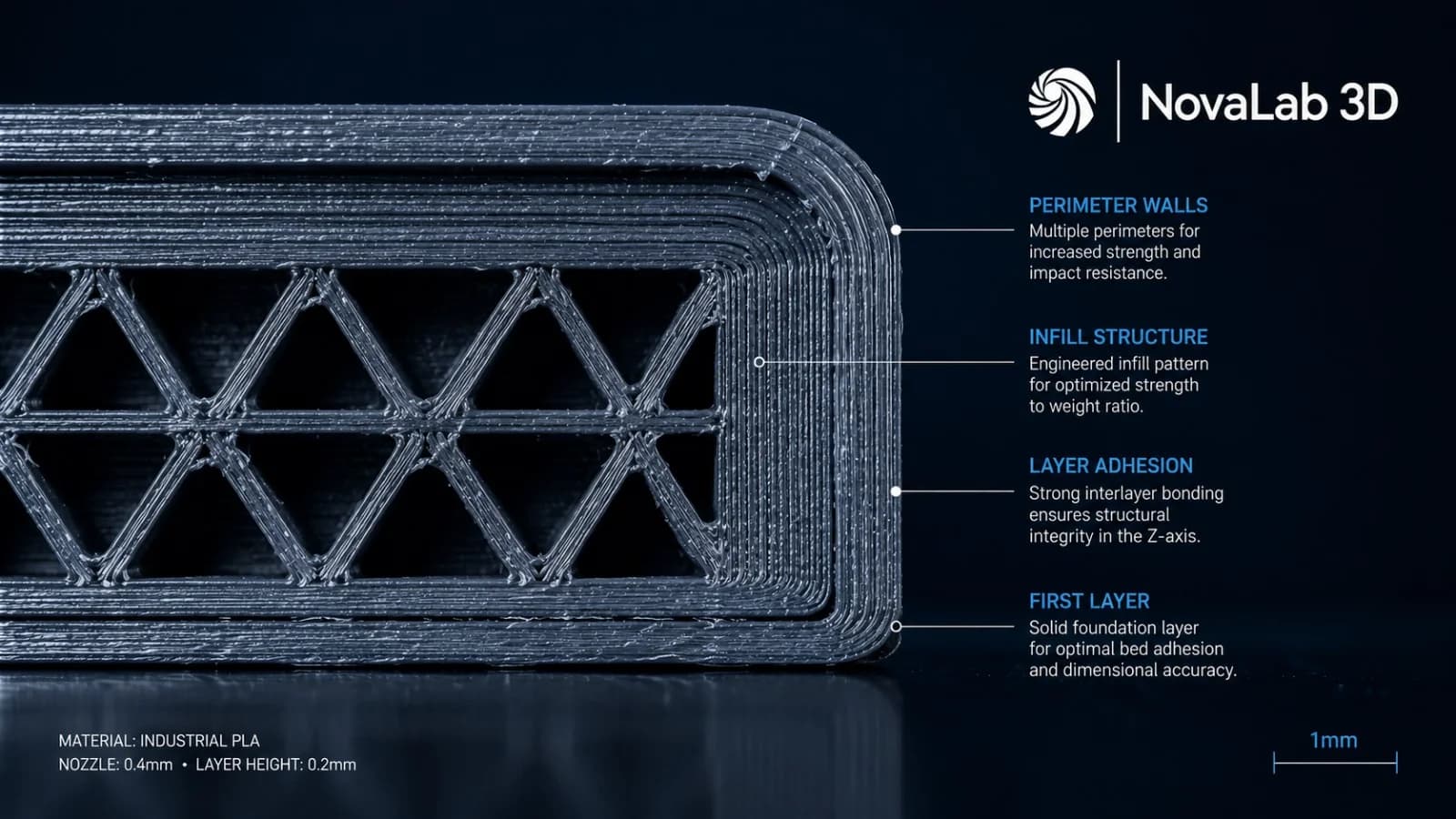
FDM 3D printing operates by extruding molten thermoplastic bead-by-bead and layer-by-layer. Because of this structure, the final part is not isotropic (having uniform properties in all directions). Instead, 3D prints are anisotropic; their strength along the X/Y axes (within a single layer) is much higher than their strength along the Z-axis (between layers).
Understanding how layers fuse is critical for engineers designing load-bearing parts.
To prevent Z-axis cleavage, orient parts so that the primary tension loads run parallel to the build plate. When shear stress across layer lines is unavoidable, increase extrusion temperatures and layer heights to improve weld strength.
Key Factors Influencing Layer Weld Strength
To ensure maximum layer adhesion, we control several critical process variables during slicing and printing at NovaLab 3D:
- Extrusion Temperature: Printing closer to the upper thermal limit of a material increases the molecular mobility of the polymer chains. This allows the new layer to melt and intermingle with the previous layer, creating a stronger molecular weld.
- Layer Height: Counterintuitively, thicker layers can sometimes reduce layer adhesion because they decrease the nozzle's squeeze (squish) pressure. A smaller layer height (e.g. 0.15mm vs 0.3mm) flatters the extruded filament shape, increasing the contact surface area between layers.
- Cooling Rates: Excessive cooling fan speed will freeze the previous layer before the new molten plastic can melt into it, leading to weak welds. However, too little cooling causes details to sag. Striking the perfect balance is part of our in-house material profiling.
Design Strategies to Beat Anisotropy
- Part Orientation: If a brackets main load acts to pull the layers apart, rotate the part 90 degrees on the build plate so that the load acts along the continuous filament strands.
- Fillets and Radii: Sharp internal corners act as stress concentrators that can initiate cracks between layers. Always design generous fillets (3mm+ radius) on load-bearing intersections.
- Reinforcement Fasteners: Through-bolts running along the Z-axis can clamp layers together, mechanically preventing them from separating under shear loads.
Get a Technical Geometry Audit
Are you concerned about layer separation in a custom prototype? Upload your CAD files to NovaLab 3D. We perform a complimentary layer stress check and recommend the ideal orientation and printing parameters for your project.
Frequently Asked Questions
Keagan Walker
Founder & Lead Designer
NovaLab 3D is a boutique engineering and additive manufacturing studio based in Pickering, North Yorkshire. We provide B2B clients and product developers with direct access to lead engineering consulting, fast 48-hour turnarounds, and custom FDM production runs.